

When setting credit limits for customers, the goal is to balance financial risk with business growth. Here’s how you can do it effectively:
- Review Payment History: Analyze how customers have managed past payments. Look at internal records, trade references, and external credit reports to identify patterns like late payments or defaults.
- Assess Financial Health: Evaluate financial documents (e.g., balance sheets, cash flow statements) to determine the customer’s ability to meet obligations. Use metrics like net worth and working capital to guide decisions.
- Set the Limit: Calculate a credit limit based on sales volume, payment terms, and your risk tolerance. Use methods like the "10% rule" (10% of net worth or working capital) as a baseline.
- Use Credit Scoring: Apply automated credit scoring tools for objective evaluations, combining internal data with external credit bureau insights. For higher-risk cases, consider adding safeguards like credit insurance.
- Monitor and Update: Regularly review and adjust credit limits based on changes in customer behavior, market conditions, or financial health. Use credit management software to automate tracking and updates.
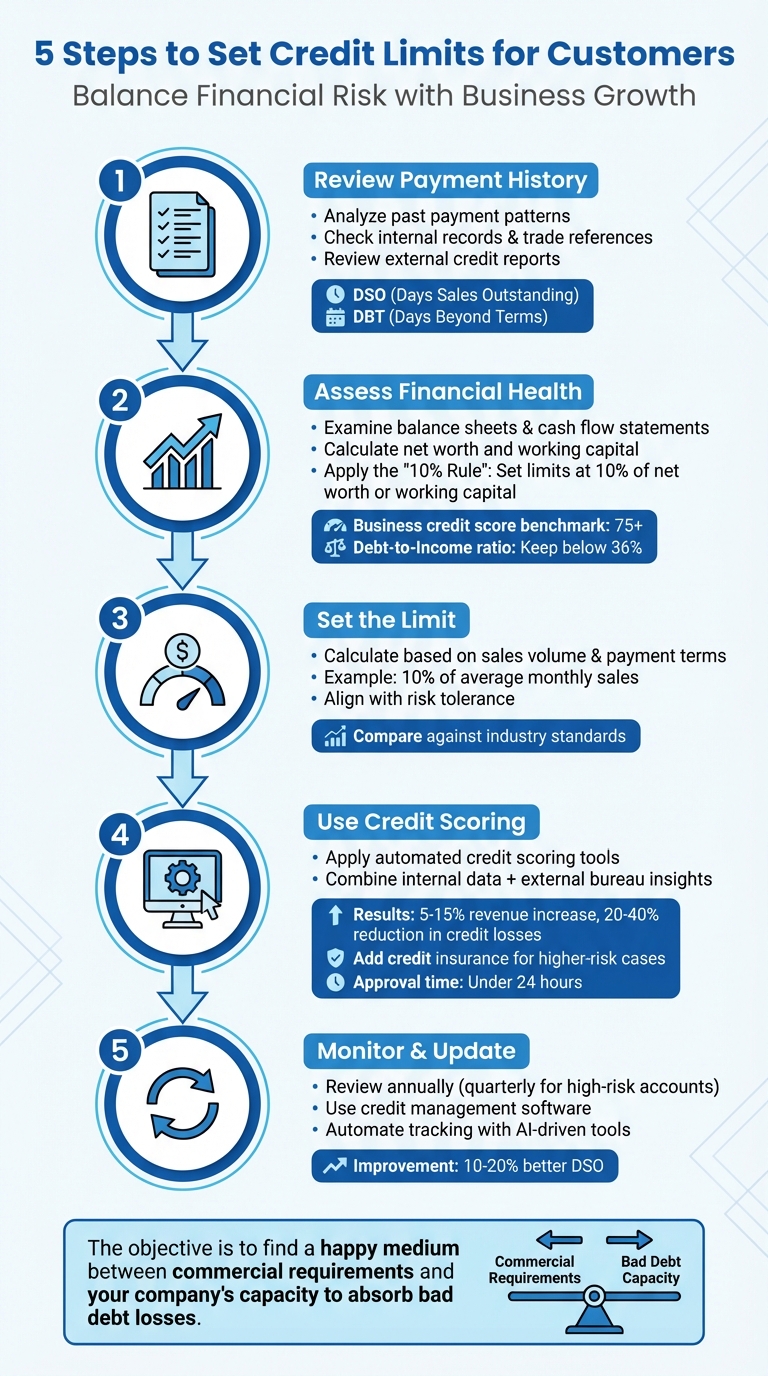
5-Step Process for Setting Customer Credit Limits
Managing Credit Limits and Credit Holds
sbb-itb-b840488
Step 1: Review Customer Payment History and Data
Setting a credit limit starts with understanding how a customer handles their financial obligations. This means gathering and analyzing critical payment data. Start by using a formal credit application to collect essential details like the customer’s legal structure, federal tax ID, banking information, and at least three trade references. This information lays the groundwork for making informed decisions about credit limits.
For existing customers, your accounts receivable ledger is a treasure trove of insights. Look for patterns in payment behavior, such as how promptly invoices are paid, the amounts involved, and any delays. Key metrics like Days Sales Outstanding (DSO) – which tracks the average time it takes for a customer to pay – and Days Beyond Terms (DBT) – which measures how late payments are – can reveal whether a customer pays reliably or tends to stretch payment terms.
Gather Payment Records
Payment records are a window into a customer’s reliability. Start by reviewing your internal data for trends. Do they typically pay within agreed terms, or do they often delay payments by 30, 60, or even 90 days? Note any defaults or partial payments. For new customers without an internal payment history, external credit reports from agencies like Dun & Bradstreet, Experian, or TransUnion can help you identify potential issues, such as judgments, liens, or a history of slow payments.
Pay attention to warning signs like sudden shifts in payment behavior. If a customer who previously paid on time starts paying late consistently, it could signal financial troubles. Similarly, customers who frequently exceed their credit limits might be struggling with cash flow.
Check Trade References
After analyzing payment records, the next step is to confirm a customer’s payment history through trade references.
"Asking customers to list trade references does little good if you don’t follow through and call them." – Don Sadler, Freelance Commercial Writer, AllBusiness.com
Trade references give you direct insight from other businesses about a customer’s payment practices. When contacting the suppliers listed in a credit application, ask detailed questions: How long have they extended credit to this customer? What is the highest credit limit they’ve offered? When was the last purchase made, and for how much? Most importantly, how often has the account been late?
Step 2: Assess Financial Health and Creditworthiness
Once you’ve reviewed payment history and trade references, the next step is to dig deeper into the customer’s financial health. This helps you gauge their creditworthiness and determine if they can reliably meet payment obligations. As Allianz Trade puts it:
"Creditworthiness is the ability of your customers to pay you, which is why it’s important to understand how to determine creditworthiness before you extend trade credit."
Examine Financial Statements
Start by requesting key financial documents like the balance sheet, income statement, and cash flow statement. These provide a snapshot of the customer’s financial position:
- Balance Sheet: This outlines total assets and liabilities, letting you calculate net worth (assets minus liabilities) and working capital (current assets minus current liabilities). These figures indicate whether the business has a cushion to handle unexpected costs or downturns.
- Cash Flow Statement: This shows whether the customer generates enough cash from operations to meet their obligations. Comparing current cash flow with past revenue and outstanding debts can reveal their ability to take on additional credit.
If the business has limited assets, you may want to request personal financial statements from the owner to back a personal guarantee.
A useful guideline is the "10% rule": set credit limits at 10% of the customer’s net worth for long-term stability or 10% of their working capital for short-term liquidity. For instance, if a customer’s net worth is $500,000, a $50,000 credit limit aligns with this approach. Adjust these limits based on their order volume and your level of risk tolerance.
To complete the picture, integrate credit scores and financial risk metrics into your evaluation.
Check Credit Scores and Risk Metrics
For businesses, a credit score of 75 or higher (on a scale of 1–100) is typically a sign of strong financial reliability. Scores below this threshold could signal the need for tighter credit limits or additional safeguards like collateral.
Beyond credit scores, consider key financial ratios such as the debt-to-income (DTI) ratio. This ratio, which divides monthly debt payments by gross monthly income, ideally should stay below 36%. A higher DTI might suggest the customer is over-leveraged and at risk of defaulting on new credit.
Another helpful tool is the Five Cs of creditworthiness:
- Character: The customer’s reputation and reliability.
- Capacity: Their ability to generate cash flow.
- Capital: The overall financial strength, reflected in net worth.
- Collateral: Assets that could secure the credit.
- Conditions: Broader economic or market factors influencing their business.
This framework allows you to assess risk from multiple perspectives instead of relying on a single metric.
Keep in mind that business credit reports can sometimes be outdated – up to a year old. To get a more accurate and current view, supplement them with real-time monitoring tools and recent trade references. Be on the lookout for warning signs like charge-offs, judgments, or liens, as these can indicate prior collection problems.
Step 3: Determine the Appropriate Credit Limit
Set a specific dollar limit for credit by balancing the customer’s financial needs with your company’s ability to manage risk. As Elizabeth Ryan from Sage explains:
"The objective is to find a happy medium between commercial requirements and your company’s capacity to absorb bad debt losses."
Factor in Sales Volume and Payment Terms
Use the customer’s financial data, along with their sales trends and payment terms, to determine an appropriate credit limit. A common method is to set the limit at 10% of the customer’s average monthly sales. For example, if a customer typically purchases $80,000 worth of goods each month, an $8,000 credit limit might be suitable. However, this method relies on historical data and may not reflect future growth. If the customer plans to expand or increase their order volume, consider raising the limit to minimize the need for frequent manual adjustments.
Payment terms are another crucial consideration. For instance, with net-30 terms, your funds are tied up for at least 30 days – and potentially longer if payments are delayed. The longer the payment terms, the higher the risk exposure for your business.
Align Limits with Risk Tolerance and Industry Standards
Once you’ve calculated a baseline limit, adjust it to fit your company’s risk tolerance and compare it with industry benchmarks. It’s essential to ensure the credit limit stays within your company’s ability to handle potential losses.
To benchmark effectively, review credit amounts reported by other suppliers through trade references. Keep in mind, though, that customers might only share references from suppliers they pay promptly. To counter this bias, supplement trade references with independent credit reports from agencies like Dun & Bradstreet or Experian. These reports provide a more comprehensive view of the customer’s creditworthiness.
Choose a method that aligns with both your company’s risk capacity and the specific profile of the customer.
Step 4: Use Credit Scoring and Finalize the Limit
Apply Credit Scoring Models
This step sharpens your earlier financial assessments by applying measurable, data-driven methods to evaluate risk. Credit scoring models assign numerical values to key factors like financial stability, payment history, and working capital, ensuring a more consistent and objective approach to determining a customer’s ability to pay.
Rather than relying on subjective judgments, automated credit tools combine internal payment records with external credit bureau data. These systems use advanced algorithms to analyze financial statements and produce risk scores that inform your final credit limit decisions. In fact, businesses using these advanced models have seen revenue increases of 5%–15% and credit losses cut by 20%–40%.
For cases involving higher risk or ambiguous qualitative factors, blending automation with human oversight is crucial. Many companies streamline this process by integrating credit scoring tools directly into their CRM systems, which allows sales teams to access real-time credit updates. With this setup, credit approvals are often completed in under 24 hours.
Once you’ve established these objective scores, you can confidently extend credit limits while employing safeguards to protect your business.
Use Credit Insurance to Extend Higher Limits
Credit insurance plays a key role in enabling higher credit limits by reducing the risk of non-payment. As Allianz Trade puts it:
"Accounts receivable insurance – sometimes called trade credit insurance – provides companies with protection against customers that fail to pay what they owe by securing their accounts receivable."
If you’re looking for detailed strategies on how to use credit insurance to protect your business while offering more generous credit terms, check out the resources available at CreditInsurance.com.
Step 5: Monitor and Update Credit Limits
Keeping credit limits up to date is essential as both customer circumstances and market conditions shift over time. Without regular monitoring, you could accidentally extend too much credit to customers who can no longer pay or, on the flip side, stifle growth by being overly cautious with reliable buyers. By continuously reviewing and adjusting credit limits, you ensure that your safeguards remain effective and aligned with current realities.
As Elizabeth Ryan explains, striking a balance between meeting business goals and managing risk requires frequent reviews of credit limits. Automated credit and collections systems can improve DSO (Days Sales Outstanding) by 10%–20%, largely because they identify and address potential issues before they escalate into major problems.
Set Up Regular Review Schedules
Make it a habit to review customer credit limits at least once a year, and consider quarterly reviews for accounts that pose higher risks. You should also trigger immediate evaluations if you notice declining payment behavior or significant changes in industry conditions. This proactive approach helps you adjust policies to match your risk tolerance and market realities, preventing issues from snowballing.
Another useful strategy is to implement automated credit holds. These holds temporarily pause orders when credit limits are exceeded, giving your team time to reassess whether the limit should be raised or if the customer’s financial health has worsened.
Use Credit Management Software
Managing credit limits with spreadsheets simply doesn’t cut it as your business grows. Dedicated credit management software offers real-time monitoring and insights. For example, platforms like Sage AR Automation provide dashboards that display custom credit scores, days past due, and available credit for each customer. These tools also integrate with external credit bureaus – such as Dun & Bradstreet, Experian, and TransUnion – to keep risk assessments updated with the latest financial data.
Modern credit management systems go a step further with AI-driven capabilities. These platforms can detect patterns in payment behavior and predict potential risks, allowing you to adjust credit limits proactively instead of scrambling to handle defaults later. They can also automate routine tasks like sending payment reminders via email or text, saving your team time and effort.
"A credit policy isn’t a static document. Review and revise it regularly to adapt to new markets or customer types."
The right software makes this ongoing adaptation manageable by centralizing key information – like customer notes, payment histories, and performance metrics – all in one place. For additional strategies, including how to incorporate insured receivables into your credit plan, check out the resources available at CreditInsurance.com.
Conclusion
Setting credit limits effectively requires a thoughtful approach that balances business growth with financial security. By following five key steps – reviewing payment history, evaluating financial health, setting appropriate limits, applying credit scoring, and maintaining ongoing monitoring – you create a cycle that supports both stability and opportunity.
As Elizabeth Ryan from Sage Advice puts it, "The objective is to find a happy medium between commercial requirements and your company’s capacity to absorb bad debt losses". Achieving this balance involves combining data-driven benchmarks with objective credit scoring and consistent monitoring. Using trade references, net worth evaluations, and needs-based analyses together helps establish well-rounded credit limits.
Regularly updating credit limits ensures they align with changing customer conditions and broader economic trends. Cedar Rose highlights that "Setting credit limits is a key aspect of credit risk management, helping businesses minimise financial losses, comply with regulations, and maintain stability". This becomes even more critical during times of inflation or market upheaval, when customer finances may shift unexpectedly.
Adding credit insurance to this framework provides an extra layer of protection. It allows businesses to offer higher credit limits to boost sales while safeguarding against potential bad debt. This blend of careful credit management and insurance coverage empowers businesses to seize growth opportunities without putting cash flow at risk. For additional guidance on integrating insured receivables into your credit strategy, visit CreditInsurance.com.
FAQs
What’s the best way to set a credit limit for a new customer?
To determine the right credit limit for a new customer, start by assessing their financial health. This involves looking into their payment history, creditworthiness, and overall financial stability – factors like working capital or net worth can be particularly telling.
You should also take into account their sales volume and how it compares to industry benchmarks. This ensures the credit limit you set is reasonable and in line with what’s typical for similar businesses.
Be prepared to make adjustments over time. Regularly reviewing their payment habits and any shifts in their financial standing is essential. This ongoing evaluation not only safeguards your business but also helps maintain a strong and trusting relationship with your customers.
What are the best tools for automating credit limit management?
Automating the management of credit limits can streamline processes and enhance precision. Tools like credit management software and accounts receivable automation systems play a key role in this. They can evaluate customer financial data, track payment patterns, and automatically adjust credit limits, ensuring decisions remain consistent and current.
Some advanced platforms, often integrating AI capabilities, take it a step further by offering real-time insights and handling routine tasks automatically. These solutions minimize manual effort, enable faster responses to shifts in customer behavior, and provide stronger oversight of credit policies.
When is it a good idea to update a customer’s credit limit?
Keeping an eye on a customer’s credit limit is smart, especially when their payment habits shift. For example, frequent late or missed payments might signal the need for an adjustment. Similarly, if their financial situation changes – whether for better or worse – or their order volume suddenly spikes, updating their credit limit can help you manage potential risks while supporting business opportunities.
By regularly reviewing and adjusting credit limits, you can strike a balance between safeguarding your business from financial risks and maintaining strong, trusting relationships with your customers.
