

Accounts receivable software and credit insurance work together to help businesses manage late payments and reduce financial risks. Here’s how:
- Accounts Receivable Software: Automates invoicing, tracks payments, and uses AI to predict payment risks. It saves time, reduces errors, and provides real-time insights into customer payment behavior.
- Credit Insurance: Protects businesses from losses due to customer defaults, covering 80%-95% of eligible unpaid invoices. It also provides customer credit data and improves access to financing by making receivables lower-risk assets.
- Integration Benefits: Combining these tools helps businesses identify risks early, streamline collections, and simplify insurance claims. It also enables faster decision-making and supports growth by allowing safer credit extensions.
How Accounts Receivable Software Supports Credit Insurance
When accounts receivable (AR) software works hand-in-hand with credit insurance, it creates a robust system for managing financial risk. Together, they provide tools and insights that help businesses stay ahead of potential issues while streamlining essential processes.
Sharing Data and Real-Time Insights
AR software integrates seamlessly with ERP systems and third-party credit data providers to offer a comprehensive view of customer accounts. This gives your finance team instant access to critical information like current credit scores, payment behaviors, and overall risk exposure – all in one centralized platform. Forget about switching between spreadsheets or waiting for outdated weekly reports. Instead, digital workflows replace manual processes, keeping all communications, invoices, and collection efforts in one place.
This integration also allows you to share up-to-the-minute credit risk data with your insurance provider. By doing so, insurers can make better coverage decisions, and you gain a permanent, automated audit trail – essential for filing claims when needed. If your AR platform is connected to insurer dashboards, you can go a step further, managing claims, submitting required documents, and tracking progress directly through a secure digital interface.
With this foundation of shared insights, automation steps in to actively identify and address potential risks.
Automating Credit Risk Monitoring
Modern AR platforms leverage AI-driven analytics to spot high-risk customers by analyzing payment patterns and predicting potential defaults before they happen. For instance, the software can flag customers who frequently break "promise-to-pay" agreements or show early signs of financial trouble. These alerts allow you to intervene before the situation worsens.
Additionally, the software can notify your team when a customer exceeds their insured credit limit or when invoices become overdue. This ensures you avoid shipping products to buyers who are already at their coverage limits. Some advanced tools even adjust credit lines dynamically for trustworthy, high-value customers by continuously monitoring their financial health. These automated credit management workflows not only reduce the likelihood of defaults but can also boost cash flow by as much as 25%.
Simplifying Claims and Collections
Beyond monitoring risks, automation makes the claims process far more efficient. If a customer fails to pay, credit insurance policies often require proof of "proper credit management practices" before a claim is approved. AR software simplifies this by automatically storing all necessary documentation – such as dunning letters and collection notes – providing clear evidence of your efforts to recover the debt.
Automation also helps prioritize customers showing warning signs, enabling you to address issues early and potentially avoid filing a claim altogether. Additionally, accurate cash application ensures payments are properly matched to invoices, giving you a precise record of unpaid balances. This accuracy is crucial for calculating insurance losses and avoiding errors that could delay claims.
How to Integrate AR Software with Credit Insurance
Checking System Compatibility
Before linking your accounts receivable (AR) software to your credit insurance system, start by evaluating your technology setup. Make sure your AR platform can integrate seamlessly with your ERP or accounting system – whether it’s SAP, Oracle, NetSuite, or Microsoft Dynamics – so you maintain a unified source for financial data. Check if your AR platform supports standard API interfaces for smooth communication with your ERP and credit insurer. If it doesn’t, confirm that it at least allows manual tracking of credit limits and policy requirements. Also, identify whether your system needs cloud-based API connections or specific connectors for on-premises applications.
Pay close attention to data hygiene. Before you begin integration, clean up your data by reviewing billing contacts, removing duplicate accounts, and standardizing payment terms across systems. This minimizes inconsistencies that could disrupt operations once the integration goes live. Once compatibility is confirmed and data is cleaned, you’re ready to set up the integration workflows.
Setting Up Integration and Workflows
After confirming system compatibility, focus on synchronizing data in stages. Start with core elements like accounting and invoicing, then move on to CRM data, and finally, integrate payment methods. This phased approach helps reduce errors and ensures compliance with your insurer’s reporting requirements.
Use a sandbox environment for testing. This allows you to verify that API connections work correctly before going live. Set up automated triggers to notify your team when actions are required – like reviewing a customer’s credit limit or reporting overdue invoices to your insurer.
The integration should handle key tasks automatically, such as exporting aging reports, top customer portfolios, sales forecasts, and loss histories directly to your credit insurer. This eliminates the need for manual spreadsheet updates, reducing errors and streamlining compliance. Once the setup is complete, make sure your team knows how to use the system effectively.
Training Your Team
Once the technical integration is in place, the next step is to ensure your team can fully leverage the new tools. They need to understand how to navigate automated workflows, interpret integrated credit scoring tools, and use data from providers like Creditsafe or Dun & Bradstreet.
Training can be delivered through eLearning modules, live sessions, or webinars, tailored to specific roles such as accountants, credit managers, and leasing agents. This ensures that everyone gets the instruction they need to perform their tasks effectively.
"Successful automation relies on your team’s ability to use the new tools effectively." – Credit‑IQ
To reinforce learning, consider implementing certification exams to confirm that employees have mastered the necessary skills. Provide accessible resources like quick reference guides and FAQs for day-to-day support. Finally, secure leadership backing to ensure the team sticks with the new processes and avoids falling back into manual workflows.
sbb-itb-b840488
Measuring the Results of Integration
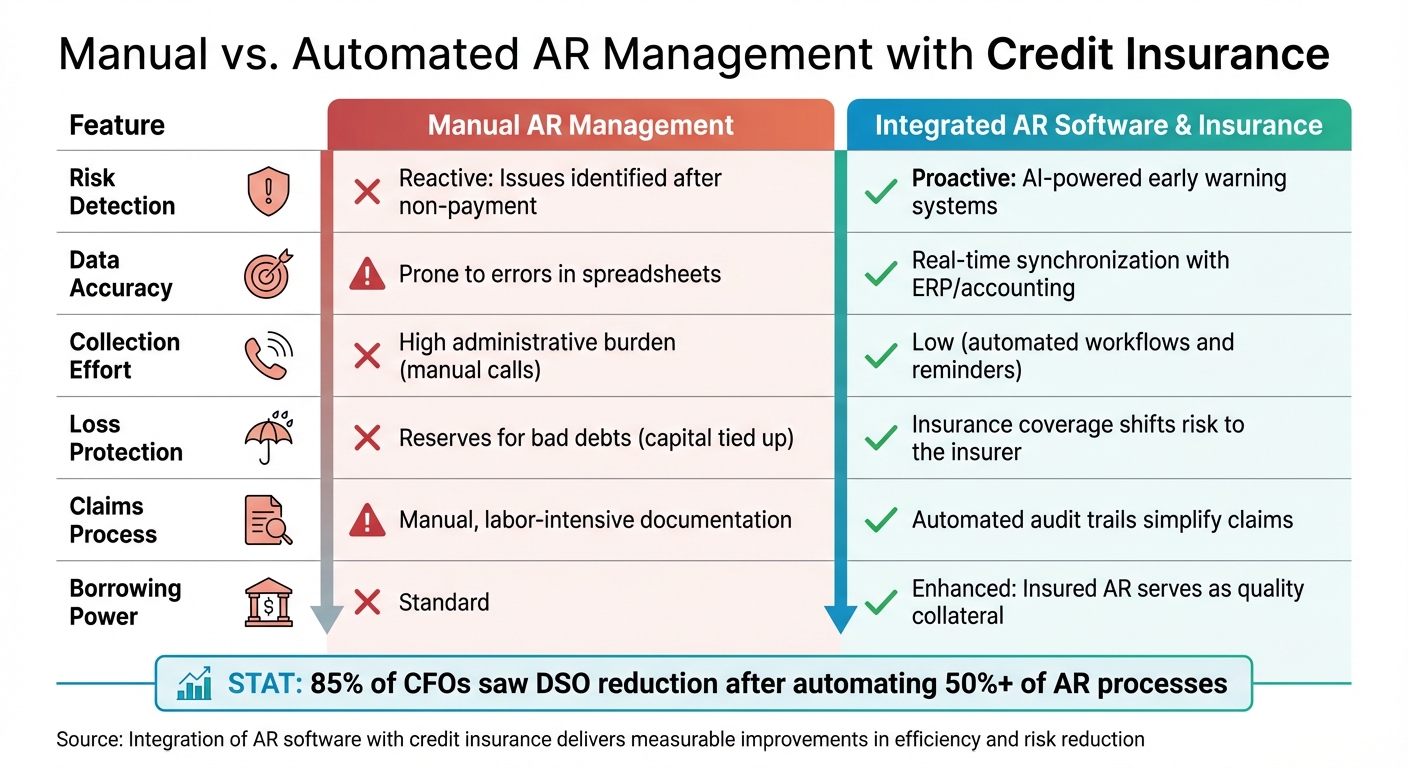
Manual vs Automated AR Management: Key Differences and Benefits
Metrics to Track
When integrating AR software with credit insurance, it’s important to evaluate how much value this combination delivers. Start by tracking Days Sales Outstanding (DSO) – a key metric that shows the average number of days it takes to collect payment. You can calculate DSO using this formula:
(Average Accounts Receivable ÷ Billed Sales) x Days in Period.
Next, compare your DSO to your Best Possible DSO, which only includes current receivables and represents the shortest possible collection time. The difference between these two numbers is your Average Days Delinquent (ADD) – the average time overdue invoices remain unpaid. A smaller gap between these metrics signals a more efficient collection process.
Another essential metric is the Collection Effectiveness Index (CEI), which measures what percentage of available receivables were collected during a specific time frame. Allianz Trade explains, "The closer the CEI is to 100%, the better your processes". Use this formula to calculate CEI:
[(Beginning AR + Monthly Credit Sales – Ending Total AR) ÷ (Beginning AR + Monthly Credit Sales – Ending Current AR)] x 100.
Also, monitor bad debt reductions, a direct benefit of credit insurance. Since accounts receivable often account for about 40% of a company’s total assets, even small improvements in these metrics can lead to meaningful financial gains.
Lastly, track your borrowing capacity. Insured receivables build trust with financial institutions, often leading to larger credit lines or better borrowing terms. Take note of any improvements in credit terms or reductions in borrowing costs after integration.
To fully understand the impact, compare these automated results to your previous manual processes.
Manual vs. Automated Processes
The benefits of integration become even clearer when you compare manual methods to automated systems. Before making the switch, document your current metrics to establish a baseline. For example, companies that automated more than half of their AR processes reported that 85% of CFOs saw a drop in DSO.
Here’s a side-by-side comparison of manual AR management versus integrated AR software and credit insurance:
| Feature | Manual AR Management | Integrated AR Software & Insurance |
|---|---|---|
| Risk Detection | Reactive: Issues identified after non-payment | Proactive: AI-powered early warning systems |
| Data Accuracy | Prone to errors in spreadsheets | Real-time synchronization with ERP/accounting |
| Collection Effort | High administrative burden (manual calls) | Low (automated workflows and reminders) |
| Loss Protection | Reserves for bad debts (capital tied up) | Insurance coverage shifts risk to the insurer |
| Claims Process | Manual, labor-intensive documentation | Automated audit trails simplify claims |
| Borrowing Power | Standard | Enhanced: Insured AR serves as quality collateral |
Before integration, manual processes often struggled to keep up with efficiency demands. The shift to integrated systems delivers measurable improvements, particularly in collection effectiveness and risk reduction. Additionally, role-based dashboards provide real-time insights into customer aging and team productivity, making it easier to identify and address issues as they arise.
Conclusion
Key Takeaways
The combination of AR software and credit insurance offers a well-rounded prevent-and-protect strategy to tackle credit risk from two essential angles. AR software serves as your early warning system, leveraging AI-driven analytics to identify risky payment behaviors before customers default. On the other hand, credit insurance provides a financial safety net, covering 80% to 95% of your losses if insolvency or bankruptcy prevents payment.
Beyond risk mitigation, this integration brings operational advantages. Automation simplifies the administrative tasks required for documenting collection efforts – an essential step for claims processing. Additionally, insured receivables are often viewed by financial institutions as lower-risk assets, which can lead to larger credit lines, better borrowing terms, and reduced administrative costs. This setup not only secures your revenue but also empowers you to confidently extend credit to larger customers or explore new markets.
The financial benefits are hard to ignore. Credit insurance premiums typically range from 0.10% to 0.20% of total sales, offering a cost-effective safeguard against potentially devastating losses. As Billtrust aptly puts it:
"What an accounts receivable insurance policy covers is only part of a complete risk strategy – automation complements insurance by helping prevent defaults before claims become necessary".
The real game-changer here is the shift from reactive to proactive risk management. With real-time data and automation, you can reduce defaults, speed up collections, and minimize the need for claims. At the same time, you’re fully protected against unavoidable losses. This forward-thinking approach ensures steady cash flow and gives you the confidence to seize growth opportunities without putting your financial stability on the line.
FAQs
How does accounts receivable software work with credit insurance to reduce financial risks?
Integrating accounts receivable (AR) software with credit insurance creates a robust solution for managing financial risks. AR software streamlines tasks such as credit monitoring, invoicing, and collections, making day-to-day operations more efficient. Meanwhile, credit insurance acts as a safety net, protecting your business from losses caused by non-payment or customer insolvency.
When these tools work together, businesses gain the ability to quickly pinpoint high-risk customers, address potential payment challenges early, and secure coverage for defaults. This combination not only helps maintain steady cash flow but also empowers businesses to make smarter credit decisions and explore financing opportunities with greater confidence.
How does AI help identify payment risks in accounts receivable software?
AI analyzes past payment behavior to identify customers who might delay payments or fail to settle their invoices. By creating risk scores, it allows businesses to focus on accounts that require urgent follow-up. This approach helps maintain steady cash flow and minimizes financial uncertainties.
How can businesses integrate accounts receivable software with credit insurance systems effectively?
To ensure your accounts receivable (AR) software works seamlessly with credit insurance systems, it’s crucial to select software that supports open APIs and includes built-in integration capabilities. These features allow key financial data – like invoices, credit limits, and customer risk profiles – to sync automatically. This not only saves time but also cuts down on manual data entry errors.
Here’s how to ensure compatibility:
- Confirm that your AR software can handle the insurer’s data format or offers middleware to translate data smoothly.
- Set up real-time or scheduled data feeds to keep exposure and policy details consistently updated.
- Test the integration in a sandbox environment before fully implementing it, ensuring everything operates as intended.
Many modern AR platforms also come with credit management tools. These can identify high-risk customers and automate checks for insurance coverage, simplifying risk management for businesses. For U.S.-based companies looking for more guidance, CreditInsurance.com offers resources to help streamline the integration process and safeguard cash flow.
